

New: AI passthrough!
This amazing Deo feature uses the power of AI to turn every VR scene into AR passthrough! Now you can take characters out of VR and have them right there with you - as if they were in the same room.
Notice: AI Passthrough is presently in beta mode, and as such, users may encounter occasional service imperfections. The feature is currently exclusive to the DeoVR app, but it will soon be accessible on both browsers and mobile devices. Your feedback is highly encouraged and appreciated.
Recommended headsets:
Meta Quest 3, and Quest Pro with stereoscopic color passthrough, Pico 4 (monoscopic color passthrough).
Compatible headsets:
Quest 2, Valve Index (monoscopic black and white passthrough).
Passthrough is not compatible yet for Oculus Link cable.
Check out our complete guide to passthrough and join in the discussion at our busy forum.
After editing and viewing through the goggles, it looked quite stable,
so although I intended it to be a test, I immediately put it to practical use.
VR180 3D shooting requires perfect synchronization between the two cameras,
and if you use handheld stabilization on each camera, the stabilization movements will not match.
This means you need to turn stabilization off and use a tripod as a standard.
However, there are some locations where a tripod is not possible (but handheld is fine),
so I decided to test out the MOZA MIni-P, which I hadn't used in a while.
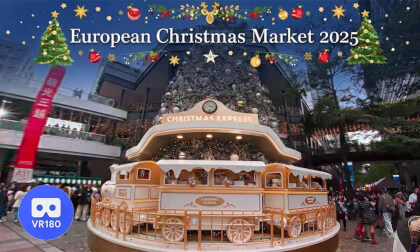
The video captures a complete illumination program, just under 5 minutes long.
Enjoy the ambiance of the scene by viewing it through the goggles.
Date of Shooting: Friday, December 19, 2025
Camera: Insta360 X5 (2 units)
Gimbal: MOZA Mini-P
Editor: Premiere Pro CC2024
(I'm Japanese and not very good at English, so I used Google Translate.)
Check it out on Google Maps!
https://maps.app.goo.gl/PZdH9aYViNGzqDraA








![[VR180 3D] Christmas illuminations and windows in the concourse of Hankyu Umeda Main Store](https://cdn-vr.deovr.com/images/96898/80895_vr-d-christmas-illuminations-and-windows-in-the-concourse-of-hankyu-umeda-main-store-cover-desktop.jpg "[VR180 3D] Christmas illuminations and windows in the concourse of Hankyu Umeda Main Store")
![[VR180 3D] Diamor Osaka's Christmas Tree "Diamor Holy Fantasy 2025"](https://cdn-vr.deovr.com/images/96067/56466_-cover-app.jpg "[VR180 3D] Diamor Osaka's Christmas Tree \"Diamor Holy Fantasy 2025\"")

![[Insta360 X5] Christmas illuminations and windows in the concourse of Hankyu Umeda Main Store December 1, 2025](https://cdn-vr.deovr.com/images/91941/66134_insta-x-christmas-illuminations-and-windows-in-the-concourse-of-hankyu-umeda-main-store-december--cover-app.jpg "[Insta360 X5] Christmas illuminations and windows in the concourse of Hankyu Umeda Main Store December 1, 2025")