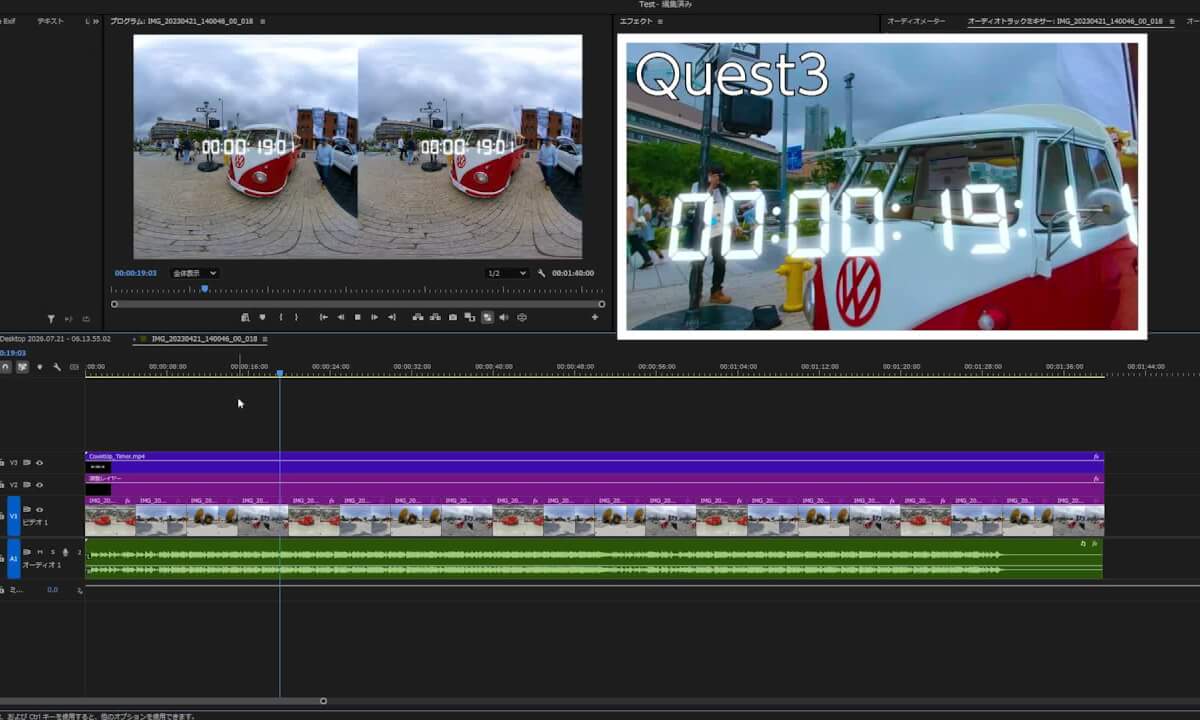
This is a demonstration of **VR Immersive Preview for Premiere & After Effects**, a Windows plugin that enables real-time VR preview on a Meta Quest headset while editing in Adobe Premiere Pro or After Effects.
Adobe removed the original immersive VR preview workflow from Premiere Pro starting with the 2023 release.
This plugin streams the VR180 content currently being edited in Premiere Pro or After Effects to an OpenXR-compatible VR headset in real time.
In this video, the Premiere Pro editing interface and the view inside a Meta Quest 3 headset are shown simultaneously to demonstrate the following features:
Real-time preview updates in the VR headset
Timeline playback
Caption position adjustment during playback
Color grading with Lumetri Color
Timeline scrubbing
By previewing your work directly inside a VR headset, you can evaluate stereoscopic depth, spatial perception, caption placement, color, and other VR-specific details before exporting your final video.
This plugin was developed by a professional 3DVR editor to recreate the workflow needed for real-world VR180 production.
Main Features
Windows only
Supports Adobe Premiere Pro 2025 and 2026
Supports Adobe After Effects 2025 and 2026
Supports VR180 Stereo Side-by-Side
OpenXR compatible
Tested with Meta Quest 3 and Meta Quest 3S
Supports wired and wireless Meta Quest Link connections
Supports wireless Steam Link connections
![[VR180 3D 8K]Sanrio Character Boat Ride (Sanrio Harmony land)](https://cdn-vr.deovr.com/images/138181/21452_vr-d-ksanrio-character-boat-ride-sanrio-harmony-land-cover-app.jpg) 07:11
07:11![[4K] Kumba - Defunct B&M Sit-down Coaster | On-ride Front Row POV | Busch Gardens Tampa](https://cdn-vr.deovr.com/images/137559/35926_k-kumba-defunct-bm-sitdown-coaster-onride-front-row-pov-busch-gardens-tampa-cover-app.jpg) 08:46
08:46 26:51
26:51 22:13
22:13 06:25
06:25 03:18
03:18 33:12
33:12 37:55
37:55 20:16
20:16 26:02
26:02 09:24
09:24