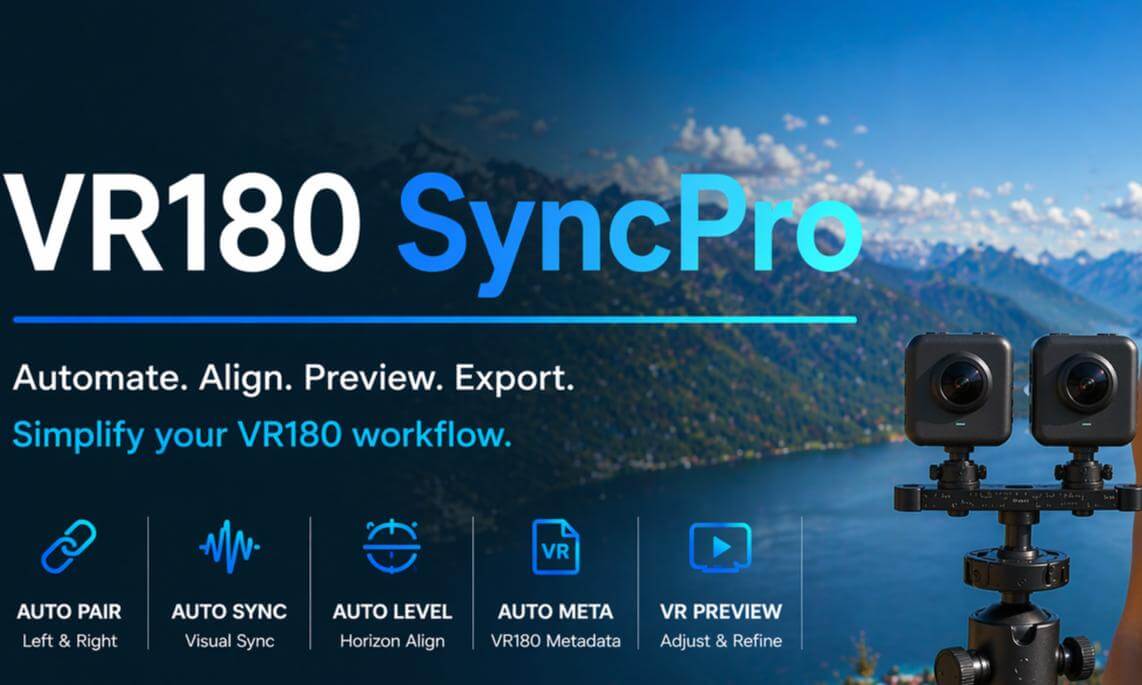
VR180 SyncPro Release on Steam on May 25

https://store.steampowered.com/app/4646160/VR180_SyncPro/?beta=0
VR180 SyncPro is a post-production tool for dual-camera VR180 creators, built to make VR180 finishing simpler, faster, and easier to complete. It streamlines the work after shooting: organizing clips, pairing left/right footage, syncing, horizon correction, preview, export, and VR180 metadata.
You can shoot naturally without clapboards, sync sounds, staged markers, or changing your recording style. The software automatically pairs left and right videos, analyzes sync, and supports automatic horizon correction, helping travel, family, pets, outdoor, and first-person footage become more stable and comfortable VR180 videos.
For GoPro workflows, VR180 SyncPro includes projection calibration for more natural results. VR Preview lets you check sync, horizon comfort, and projection closer to the final viewing experience, while adjusting frame offset, horizon angle, and projection mode directly.
Export automatically writes VR180 metadata so platforms and players can recognize the file correctly. The software also supports batch processing, custom fisheye lenses, Rectilinear Video, and One-Click VR180 Export in as few as seven mouse actions.
 05:02
05:02![[360 VR] Lost in Rio: Copacabana Beach Dog POV Walking Tour](https://cdn-vr.deovr.com/images/138728/41408_copacabana--cover-app.jpg) 02:55
02:55 02:19
02:19![[VR180] Feathery Celosia in Musashi-Kyuryo National Government Park](https://cdn-vr.deovr.com/images/139903/41211_vr-feathery-celosia-in-musashikyuryo-national-government-park-cover-app.jpg) 02:07
02:07 03:36
03:36 27:41
27:41 15:27
15:27 03:36
03:36 18:13
18:13 07:00
07:00 00:36
00:36