
DeoVR will be hosting two events in this April, which are:
1. In collaboration with the XR Guild, we are hosting an exclusive creator meetup in New York City.
2. We’ll have a dedicated booth at HarvardXR, showcasing the cutting edge of spatial computing and VR media.

The highlight of these events is our Multi-User feature (currently in Beta). This allows you to sit in a virtual cinema with creators and enjoy high-quality VR content in with them!
📅 Event Schedule (East Coast Time, EST)
To accommodate different regions and time zones, we have scheduled the following sessions:
| Date | Event | Time (EDT) | Format |
| April 9 | NYC Creator Meetup | 6:00 PM - 9:00 PM | Hybrid (In-person & Online) |
| April 11 | HarvardXR Booth | 10:00 AM - 12:00 PM | Hybrid (In-person & Online) |
| April 11 | HarvardXR Booth | 1:30 PM - 5:00 PM | Hybrid (In-person & Online) |
Creator Hosts: (April 11)
- Michael Breer (Specterras Productions)
- Frédérick Destrem (VeryReal)
- 11am EST
- https://deovr.com/channel/veryreal
- Enrique Ruiz (Wild Wonderful Weekends)
- 1pm EST
- https://deovr.com/d92cg6
- Tony E (BlackBoxTV)
- 1:30pm EST
- https://deovr.com/bnq72v
- Otto Fabri (FLYOtto)
- 2:30pm EST
- https://deovr.com/channel/flyotto
- Brad Cohen (Buzztv)
- 3:30pm EST HavardXR
- https://deovr.com/g0auzt
💡 How to get the Room Code? We will keep a Google Meet running throughout the event. The 6-digit room codes will be shared live within the Google Meet.
Google Meet link: https://meet.google.com/utb-vhws-xoq
📥 Download & Installation Guide
Please complete these steps before the event starts:
-
Download DeoVR Hyper in Meta Store: https://www.meta.com/en-gb/experiences/hyper-deovr-vr-video-player/25289867110644741/
-
How to activae Watch Party:
- Open the app
- Click "+" to open address bar
- Type - MUD or mud
- Click enter
- Watch party interface will appear
.png)
- Enter the 6-digit room code provided by the Host and click Join.
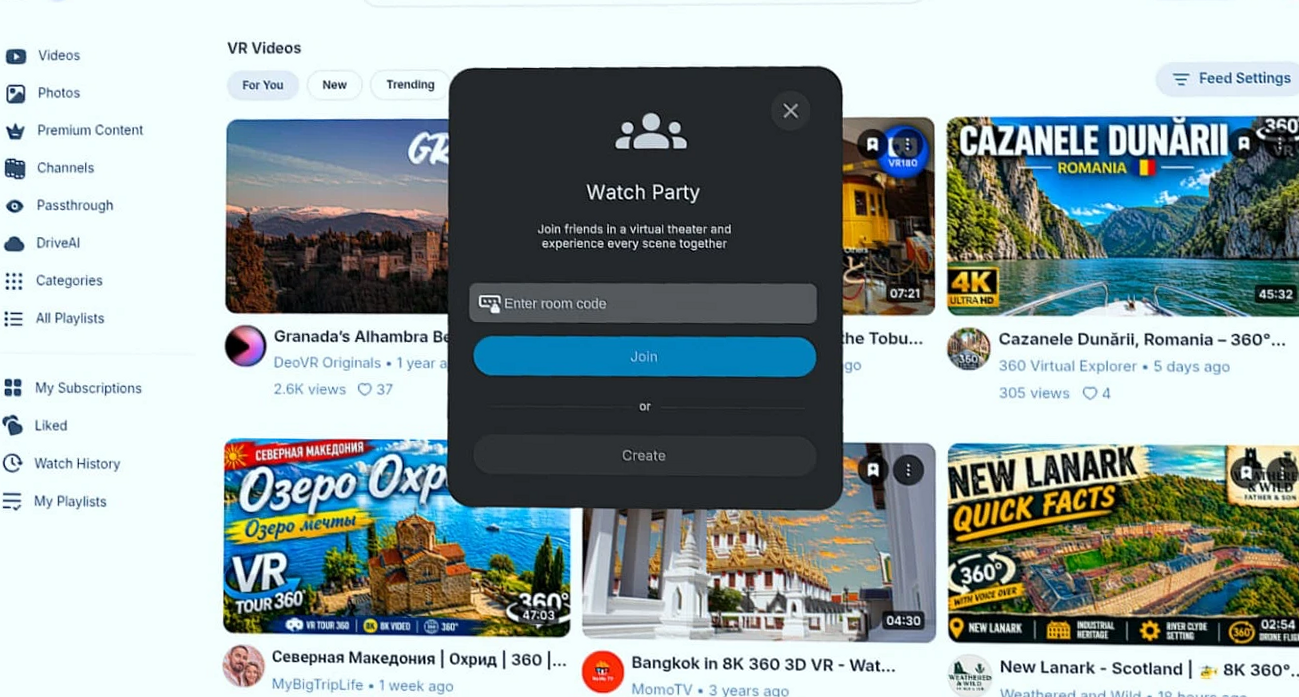
Prerequisites:- You must be logged in to your DeoVR account. Access without authentication will prevent the feature from functioning
⚠️ Important Rules & Known Limitations
To ensure a smooth experience for everyone, please keep the following in mind:
- Sync Rules: Non-host users must not open videos manually. Doing so will forcibly remove you from the room and require you to rejoin.
- Reset Your View: If your view position feels off, press and hold the "Meta" button on your controller for 5 seconds to reset the dome position.
- Interface Toggle: To hide or show the right-side Multi-User panel, simply click the Watch party button again.
.png)
We can’t wait to see you in the virtual theater!